将文件夹变成完整的 AI 团队
学习管理 AI 代理的 Markdown 文件方法,它们可以管理你的邮箱、日历、广告和日常运营。无需编码。一套系统,覆盖每个部门。
重大转变:从聊天到代理
大多数人停留在 AI 的第一阶段。他们输入一个问题,得到一个答案,然后自己完成工作。这就是聊天。聊天就像乒乓球。
代理则不同。你给代理一个目标,它规划步骤、执行操作并交付结果。Remy Gaskill 称之为“从问题到答案”与“从目标到结果”的区别。
使用代理的创始人和员工每天的生产力提高 10 到 20 倍。积累数周数月,你就会远远领先。
代理循环如何工作
每个代理都遵循相同的三步循环:观察、思考、行动。
给它一个任务,比如“为 Greg Eisenberg 建一个作品集网站”。流程如下:
- 它检查工作区中已有的文件(观察)
- 它决定需要研究 Greg Eisenberg(思考)
- 它去做研究(行动)
然后循环回去。现在它有了研究资料,它思考:“我需要一个计划。”它写出计划。再次循环,写代码。再次循环,搭建网站。再次循环,截屏结果以确认完成。
代理会不断通过观察、思考、行动循环,直到根据你设置的参数认定任务完成。
代理框架:学会开车,就能开任何车
Claude Code、Codex、Antigravity、Cowork、Manus、OpenClaw。这些都是“代理框架”。不同的应用运行相同的循环。
可以把它想象成学开车。一旦你了解了油门、刹车和方向盘的使用方法,你就能开任何车——丰田、路虎。功能可能不同(座椅加热、定速巡航),但基础操作是一样的。
Remy 在 Claude Code、Codex 和 Antigravity 上演示了相同的提示。这三者都构建了一个工作中的投资组合网站。相同的循环,不同的风格。
步骤 01:创建您的代理大脑(agents.md 文件)
首先,在您的计算机上创建一个文件夹。命名为“executive assistant”。现在,这个文件夹是空的。如果您让代理编写一封冷邮件,它不知道您是谁、您卖什么、或者您的目标对象是谁。
解决方法:一个 agents.md 文件。这是您的代理系统提示。它在每个任务之前加载。输入您的角色、业务背景、偏好、使用的工具以及您的工作方式。不同的平台称其为不同的名称:
Claude Code → claude.md
Codex / OpenClaw → agents.md
Gemini → gemini.md
相同的概念。一个 markdown 文件,在代理开始工作之前提供上下文。
专业提示:您可以使用任何聊天模型来构建这个文件。只需说“请用面试风格提问,以提取所需的所有上下文,然后为我创建一个 agents.md 文件。” 它会将您的所有想法提取出来并为您构建结构。这是从提示工程到上下文工程的最大转变。为您的代理提供足够的关于您业务的信息后,您的提示可以简单得愚蠢。只需说“写一封冷邮件”,上下文已经在那儿了。
步骤 02:赋予您的代理记忆(memory.md)
问题来了。您告诉代理“我最喜欢的颜色是薰衣草色。”它说“明白了。”下一次会话呢?它什么都不记得。像 ChatGPT 这样的聊天模型有自动记忆功能,它们会将信息保存在云端,而您无法控制。而代理则不同。您自己控制记忆。
将以下内容添加到您的 agents.md 文件中:
- 一行写着 "read memory.md before every task"
- 一行写着 "when I correct you or you learn something new, update memory.md"
然后在同一文件夹中创建一个空白的 memory.md 文件。现在,当你说 "quit writing so formally" 时,代理会更新 memory.md 文件,内容为 "keep tone casual, never formal"。每个未来的会话都会延续这个偏好。优秀的员工会记住你的偏好并不断改进,你的代理也应该如此。最佳实践:保持 agents.md 文件在 200 行以内。如果 memory 文件开始保存细小的修改,请更新说明,改为 "only save substantial corrections"。您可以稍后手动清理。
步骤 03:连接你的工具(MCP)
默认情况下,大多数代理工具包都带有网页搜索功能,仅此而已。如果您想连接 Gmail、Google 日历、Notion、Stripe、Granola 或其他您使用的工具,您需要 MCP(模型上下文协议)。这里有一个简单的理解方式:
在没有 MCP 之前,您的代理必须学习每个工具的语言。Claude 讲英语,Notion 讲西班牙语,Gmail 讲法语,Slack 讲中文。连接它们需要定制开发。Anthropic 构建了 MCP 作为一个通用翻译器。您的代理仍然讲英语,您的工具仍然讲它们的语言,MCP 位于中间,进行双向翻译。现在大多数工具包都让这变得容易。Cowork、Codex、Manus 和 Perplexity 都有“连接器”或“技能”菜单,您可以在其中浏览应用并登录。一键连接。一旦连接完成,真正的生产力提升就开始了。Remy 在现场演示了这一点:他要求一个代理总结他的收件箱内容,从 Granola 获取会议记录,创建 Stripe 支付链接,设置 Notion 项目,并草拟一封跟进邮件。只需一个提示。
代理完成了所有工具操作,而 Remy 连一个标签页都没切换。“即使你只是把某件事的速度提高七倍,而不需要进入这些工具,它的效果也会不断叠加。”
第 04 步:构建技能(AI 的 SOP)
技能是产生复利的引擎。可以把技能看作是为你的代理设计的标准操作流程(SOP)。你只需解释一次流程,代理就能每次都完美复现。
没有技能时:
你让代理写一份客户提案。你来回沟通 30 分钟。改格式,把价格移到底部,用这种蓝色。最后终于做出一个不错的版本。下周,又得从头开始。
有了技能:
代理加载你的提案技能。它已经知道格式、配色、价格的位置。几分钟就完成。
创建技能有两种方式:
方法 1:提供源材料。
Remy 把一整套关于爆款钩子的课程逐字稿上传,并告诉代理:“基于这门课程帮我构建一个爆款钩子技能。”代理将其打包成一个 .skill 文件,包含指令和参考资料。
方法 2:从实时会话中构建。
和代理一起手动完成一遍流程。当你对结果满意后,说一句:“把我们刚刚做的流程创建为一个技能。”它会把整个工作流程打包。
Remy 的真实案例:
他通过与 Claude 走一遍流程,构建了一个广告库分析技能。包括抓取竞品广告、截取落地页截图、分析文案与创意,并生成一份总报告。这个流程过去需要 3–4 小时。现在他只需输入两个词,技能就会自动运行。
如果你每周用技能自动化 3–5 个微小的手动流程,最终你会实现整个工作流程的自动化。
第 05 步:串联技能并安排任务
当你把多个技能组合起来时,它们的威力才真正显现出来。
一项会议准备技能会研究嘉宾并整理讨论要点。一项播客研究技能会深入了解嘉宾的背景。一项早间简报技能会查看你的日程,如果发现有播客,它会自动触发研究技能。现在,大多数工具都支持定时任务。将你的早间简报技能设置为每天早上9点运行。它会检查你的日程,概括你的收件箱,从Notion中提取项目更新,并提供每日计划。雷米的真实案例:他正在购买一辆特定颜色并具有特定功能的汽车。每三小时,一名代理会抓取CarMax、Cars.com、Autotrader和其他市场的内容,然后在找到匹配的车辆时发送通知。这为他节省了每天刷新标签页的一个小时。
经营企业的文件夹结构
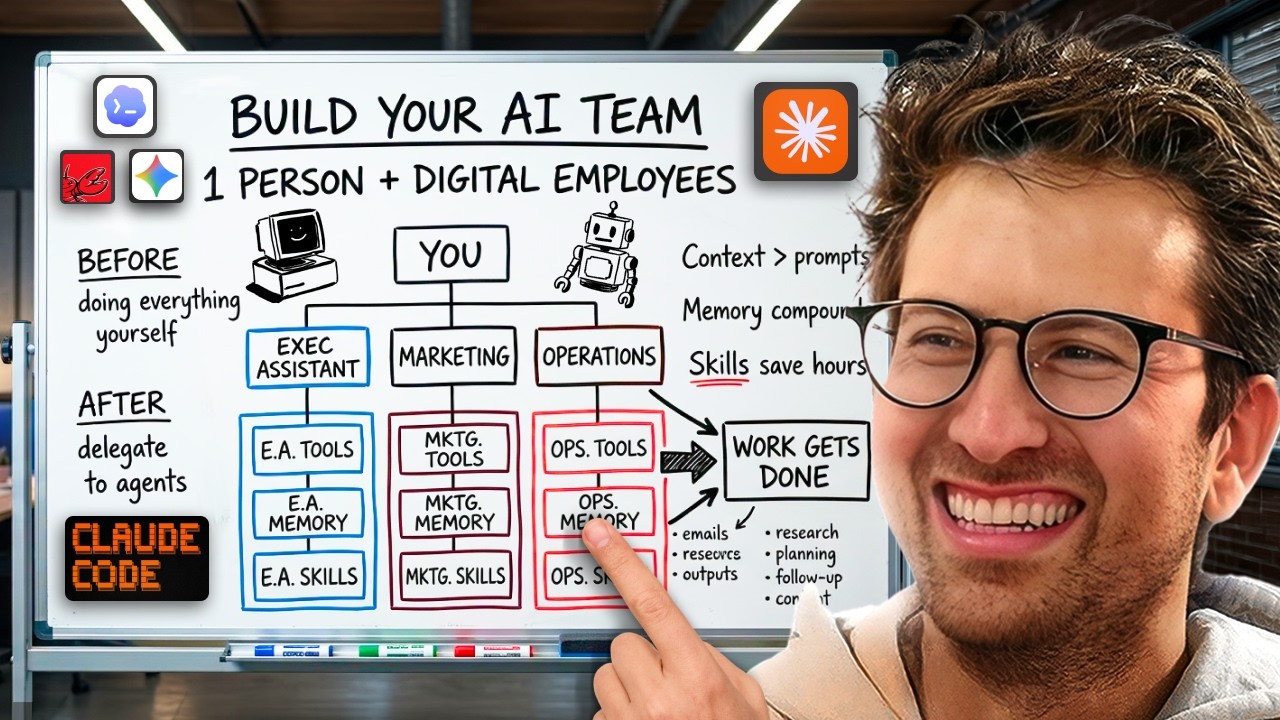
雷米的完整设置:每个公司或客户一个大文件夹。文件夹内,每个部门一个子文件夹:执行助理、内容团队、营销主管、销售团队。每个子文件夹都有自己的agents.md、memory.md、技能文件夹和MCP连接。营销代理知道广告创意规则,内容代理知道你的品牌声音,执行助理知道你如何签署邮件。在顶部,一个全局代理管理所有代理。
全局与项目级:
一些技能适用于所有地方(比如“缩短这个”技能)。这些技能是全局性的。“推荐某人给Sebastian”的技能只属于执行助理文件夹。保持项目级技能在其相应项目中。
从哪里开始
- 选择一个代理工具(Cowork是初学者最容易上手的)
- 创建一个名为“执行助理”的文件夹
- 使用采访式提示构建agents.md文件
- 添加一个memory.md文件,包含自更新说明
- 通过MCP连接你最常用的工具
- 使用代理处理真实任务
当你重复一个流程时,就把它变成一项技能。每周自动化3-5个小流程。真正面向未来的技术栈,是你电脑上的 markdown 文件。工具会不断变化,但你的上下文文件、记忆和技能可以在任何工具之间迁移。核心要点:每个人都会拥有一个 AI 操作系统。你的代理会随着时间不断积累。更多上下文,更少错误;更多技能,更少手动操作。这个循环很简单:连接工具 → 构建上下文 → 创建技能 → 自动化流程 → 重复。你不是在取代自己,而是在压缩琐碎工作,让你专注于真正重要的决策。从“行政助理”开始。本周先构建一个技能,下周再加一个。持续几个月叠加起来,你就能把一周的工作压缩到一天完成。
查看完整节目:
Spotify: https://open.spotify.com/episode/361XxtzIMv7DAbMQP7Pjza?si=04e865752a684869
Youtube: https://www.youtube.com/watch?v=eA9Zf2-qYYM
Apple: https://podcasts.apple.com/us/podcast/the-startup-ideas-podcast/id1593424985?i=1000755818065
显示英文原文 / Show English Original
Turn Folders Into a Full AI Team Learn the markdown file method behind AI agents that manage your email, calendar, ads, and daily operations. No code required. One system, every department. The Big Shift: Chat to Agents Most people are stuck in stage one of AI. They type a question. They get an answer. They do the work themselves. That's chat. Chat is ping pong. Agents are different. You give an agent a goal. It plans the steps. It executes. It delivers a result. Remy Gaskill calls it "question to answer" vs. "goal to result." The founders and employees using agents are 10 to 20 times more productive in their day. Stack that over weeks and months, and you're miles ahead. How the Agent Loop Works Every agent runs on the same three-step cycle: observe, think, act. Give it a task like "build me a portfolio site for Greg Eisenberg." Here's what happens: It checks the workspace for existing files (observe) It decides it needs to research Greg Eisenberg (think) It goes and does the research (act) Then it loops back. Now it has the research. It thinks: "I need a plan." It writes the plan. Loops again. Writes the code. Loops again. Spins up the site. Loops again. Screenshots the result to verify it's done. The agent keeps going through observe, think, act until it can conclude the task is complete based on the parameters you set. Agent Harnesses: Learn to Drive, Pick Any Car Claude Code, Codex, Antigravity, Cowork, Manus, OpenClaw. These are all just "agent harnesses." Different apps running the same loop. Think of it like learning to drive. Once you know how the pedals, brakes, and steering work, you can jump in any car. A Toyota, a Range Rover. The features are different (seat warmers, cruise control), but the fundamentals are the same Remy demoed the same prompt across Claude Code, Codex, and Antigravity. All three built a working portfolio site. Same loop. Different flavors. Step 01: Create Your Agent's Brain (the agents.md file) Start by creating a folder on your computer. Call it "executive assistant." Right now, that folder is empty. If you ask the agent to write a cold email, it has no idea who you are, what you sell, or who you're targeting. The fix: an agents.md file. This is your agent's system prompt. It loads before every task. Put in your role, your business context, your preferences, the tools you use, and how you like to work. Different harnesses call it different things: Claude Code → claude.md Codex / OpenClaw → agents.md Gemini → gemini.md Same concept. A markdown file that gives the agent context before it starts working. Pro tip: You can use any chat model to build this file. Just say "ask me interview-style questions to extract all the context you need, then build me an agents.md file." It will pull everything out of your head and structure it for you. This is the biggest shift from prompt engineering to context engineering. Load up your agent with enough information about your business, and your prompts can be stupidly simple. "Write me a cold email" is all you need when the context is already there. Step 02: Give Your Agent a Memory (memory.md) Here's the problem. You tell your agent "my favorite color is lavender." It says "got it." Next session? It has no idea. Chat models like ChatGPT have auto-memory. They save things in the cloud without you controlling it. Agents work differently. You control the memory yourself Add two things to your agents.md file: A line that says "read memory.md before every task" A line that says "when I correct you or you learn something new, update memory.md" Then create a blank memory.md file in the same folder. Now when you say "quit writing so formally," the agent updates memory.md with "keep tone casual, never formal." Every future session carries that preference forward. Good employees remember your preferences and improve over time. Your agent should too. Best practice: Keep your agents.md file under 200 lines. If your memory file starts saving tiny corrections, update the instructions to say "only save substantial corrections." You can always do a manual cleanup later. Step 03: Connect Your Tools (MCP) By default, most agent harnesses come with web search. That's it. To connect Gmail, Google Calendar, Notion, Stripe, Granola, or whatever else you use, you need MCP (Model Context Protocol). Here's the simplest way to think about it. Before MCP, your agent had to learn each tool's language. Claude speaks English. Notion speaks Spanish. Gmail speaks French. Slack speaks Chinese. Connecting them required custom development. Anthropic built MCP as a universal translator. Your agent still speaks English. Your tools still speak their languages. MCP sits in the middle and translates both directions. Most harnesses now make this easy. Cowork, Codex, Manus, and Perplexity all have "connectors" or "skills" menus where you browse apps and sign in. One click. Once connected, this is where the real productivity gains happen. Remy demoed this live: he asked one agent to summarize his inbox, pull meeting notes from Granola, create a Stripe payment link, set up a Notion project, and draft a follow-up email. One prompt The agent hit every tool without Remy switching a single tab. "Even if you can just do something seven times faster without having to go into all these tools, it really starts to compound." Step 04: Build Skills (SOPs for AI) Skills are the compounding engine. Think of a skill as a standard operating procedure, but for your agent. You explain a process once, and the agent can repeat it perfectly every time. Without a skill: You ask the agent to write a client proposal. You go back and forth for 30 minutes. Change the formatting. Move the price to the bottom. Use this shade of blue. You finally land on something good. Next week, you start from scratch. With a skill: The agent loads your proposal skill. It already knows the format, the colors, where the price goes. Done in minutes. There are two ways to create skills: Method 1: Feed it source material. Remy took a full course transcript on viral hooks, uploaded it, and told the agent "build me a viral hook skill based on this course." The agent packaged it into a .skill file with instructions and reference material. Method 2: Build one from a live session. Go through a process manually with the agent. Once you're happy with the result, say "create a skill for what we just did." It packages the entire workflow. Remy's real example: he built an ad library analysis skill by going through the process once with Claude. Scraping competitor ads, screenshotting landing pages, analyzing copy and creatives, building a master report. That process used to take 3-4 hours. Now he types two words and the skill runs. If you automate 3-5 tiny manual processes each week with skills, you eventually automate your entire workflow. Step 05: Chain Skills and Schedule Tasks Skills get powerful when you combine them A meeting prep skill researches the guest and compiles talking points. A podcast research skill digs into a guest's background. A morning brief skill checks your calendar, and if it sees a podcast, it triggers the research skill automatically. Most harnesses now support scheduled tasks. Set your morning brief skill to run at 9am every day. It reviews your calendar, summarizes your inbox, pulls project updates from Notion, and delivers a daily game plan. Remy's real-world example: he's buying a car in a specific color with a specific feature set. Every three hours, an agent scrapes CarMax, Cars.com, Autotrader, and other marketplaces, then sends him a notification when something matches. That saves him an hour a day of refreshing tabs like a maniac. The Folder Structure That Runs a Business Remy's full setup: One big folder per company or client. Inside, a subfolder for each department: executive assistant, content team, head of marketing, sales. Each subfolder has its own agents.md, memory.md, skills folder, and MCP connections. The marketing agent knows ad creative rules. The content agent knows your brand voice. The executive assistant knows how you sign off emails. At the top, one overarching agent manages them all. Global vs. project level: Some skills apply everywhere (like a "make this shorter" skill). Those go global. A "refer someone to Sebastian" skill only belongs in the executive assistant folder. Keep project-level skills in their projects. Where to Start Pick one agent harness (Cowork is the easiest for beginners) Create a folder called "executive assistant" Build your agents.md file using interview-style prompting Add a memory.md file with the self-updating instructions Connect your most-used tools via MCP Use the agent for real tasks When you repeat a process, turn it into a skill Automate 3-5 small processes per week The real future-proof stack is markdown files on your computer. The harnesses will keep changing. Your context files, memory, and skills transfer to any of them. The Bottom Line Everyone's going to have an AI operating system. Your agents will compound over time. More context, fewer errors. More skills, less manual work. The cycle is simple: connect tools → build context → create skills → automate processes → repeat. You're not replacing yourself. You're compressing the busywork so you can focus on the decisions that actually matter. Start with the executive assistant. Build one skill this week. Then another next week. Stack that over months, and you'll fit a week into a day. Checkout the full episode:
Spotify: https://open.spotify.com/episode/361XxtzIMv7DAbMQP7Pjza?si=04e865752a684869
Youtube: https://www.youtube.com/watch?v=eA9Zf2-qYYM
Apple: https://podcasts.apple.com/us/podcast/the-startup-ideas-podcast/id1593424985?i=1000755818065