 Grande AI Hub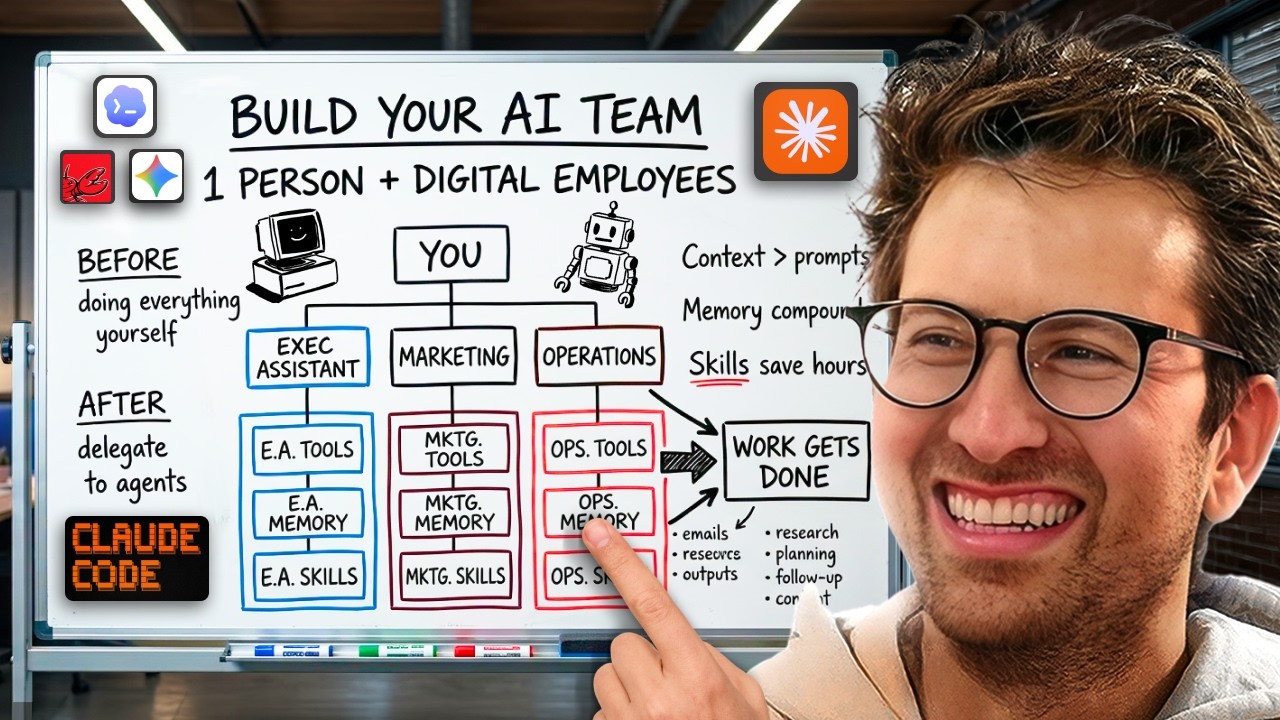
Turn Folders Into a Full AI Team Learn the markdown file method behind AI agents that manage your email, calendar, ads, and daily operations. No code required. One system, every department. The Big Shift: Chat to Agents Most people are stuck in stage one of AI. They type a question. They get an answer. They do the work themselves. That's chat. Chat is ping pong. Agents are different. You give an agent a goal. It plans the steps. It executes. It delivers a result. Remy Gaskill calls it "question to answer" vs. "goal to result." The founders and employees using agents are 10 to 20 times more productive in their day. Stack that over weeks and months, and you're miles ahead. How the Agent Loop Works Every agent runs on the same three-step cycle: observe, think, act. Give it a task like "build me a portfolio site for Greg Eisenberg." Here's what happens: It checks the workspace for existing files (observe) It decides it needs to research Greg Eisenberg (think) It goes and does the research (act) Then it loops back. Now it has the research. It thinks: "I need a plan." It writes the plan. Loops again. Writes the code. Loops again. Spins up the site. Loops again. Screenshots the result to verify it's done. The agent keeps going through observe, think, act until it can conclude the task is complete based on the parameters you set. Agent Harnesses: Learn to Drive, Pick Any Car Claude Code, Codex, Antigravity, Cowork, Manus, OpenClaw. These are all just "agent harnesses." Different apps running the same loop. Think of it like learning to drive. Once you know how the pedals, brakes, and steering work, you can jump in any car. A Toyota, a Range Rover. The features are different (seat warmers, cruise control), but the fundamentals are the same
Remy demoed the same prompt across Claude Code, Codex, and Antigravity. All three built a working portfolio site. Same loop. Different flavors. Step 01: Create Your Agent's Brain (the agents.md file) Start by creating a folder on your computer. Call it "executive assistant." Right now, that folder is empty. If you ask the agent to write a cold email, it has no idea who you are, what you sell, or who you're targeting. The fix: an agents.md file. This is your agent's system prompt. It loads before every task. Put in your role, your business context, your preferences, the tools you use, and how you like to work. Different harnesses call it different things: Claude Code → claude.md Codex / OpenClaw → agents.md Gemini → gemini.md Same concept. A markdown file that gives the agent context before it starts working. Pro tip: You can use any chat model to build this file. Just say "ask me interview-style questions to extract all the context you need, then build me an agents.md file." It will pull everything out of your head and structure it for you. This is the biggest shift from prompt engineering to context engineering. Load up your agent with enough information about your business, and your prompts can be stupidly simple. "Write me a cold email" is all you need when the context is already there. Step 02: Give Your Agent a Memory (memory.md) Here's the problem. You tell your agent "my favorite color is lavender." It says "got it." Next session? It has no idea. Chat models like ChatGPT have auto-memory. They save things in the cloud without you controlling it. Agents work differently. You control the memory yourself
Add two things to your agents.md file: A line that says "read memory.md before every task" A line that says "when I correct you or you learn something new, update memory.md" Then create a blank memory.md file in the same folder. Now when you say "quit writing so formally," the agent updates memory.md with "keep tone casual, never formal." Every future session carries that preference forward. Good employees remember your preferences and improve over time. Your agent should too. Best practice: Keep your agents.md file under 200 lines. If your memory file starts saving tiny corrections, update the instructions to say "only save substantial corrections." You can always do a manual cleanup later. Step 03: Connect Your Tools (MCP) By default, most agent harnesses come with web search. That's it. To connect Gmail, Google Calendar, Notion, Stripe, Granola, or whatever else you use, you need MCP (Model Context Protocol). Here's the simplest way to think about it. Before MCP, your agent had to learn each tool's language. Claude speaks English. Notion speaks Spanish. Gmail speaks French. Slack speaks Chinese. Connecting them required custom development. Anthropic built MCP as a universal translator. Your agent still speaks English. Your tools still speak their languages. MCP sits in the middle and translates both directions. Most harnesses now make this easy. Cowork, Codex, Manus, and Perplexity all have "connectors" or "skills" menus where you browse apps and sign in. One click. Once connected, this is where the real productivity gains happen. Remy demoed this live: he asked one agent to summarize his inbox, pull meeting notes from Granola, create a Stripe payment link, set up a Notion project, and draft a follow-up email. One prompt
The agent hit every tool without Remy switching a single tab. "Even if you can just do something seven times faster without having to go into all these tools, it really starts to compound." Step 04: Build Skills (SOPs for AI) Skills are the compounding engine. Think of a skill as a standard operating procedure, but for your agent. You explain a process once, and the agent can repeat it perfectly every time. Without a skill: You ask the agent to write a client proposal. You go back and forth for 30 minutes. Change the formatting. Move the price to the bottom. Use this shade of blue. You finally land on something good. Next week, you start from scratch. With a skill: The agent loads your proposal skill. It already knows the format, the colors, where the price goes. Done in minutes. There are two ways to create skills: Method 1: Feed it source material. Remy took a full course transcript on viral hooks, uploaded it, and told the agent "build me a viral hook skill based on this course." The agent packaged it into a .skill file with instructions and reference material. Method 2: Build one from a live session. Go through a process manually with the agent. Once you're happy with the result, say "create a skill for what we just did." It packages the entire workflow. Remy's real example: he built an ad library analysis skill by going through the process once with Claude. Scraping competitor ads, screenshotting landing pages, analyzing copy and creatives, building a master report. That process used to take 3-4 hours. Now he types two words and the skill runs. If you automate 3-5 tiny manual processes each week with skills, you eventually automate your entire workflow. Step 05: Chain Skills and Schedule Tasks Skills get powerful when you combine them
A meeting prep skill researches the guest and compiles talking points. A podcast research skill digs into a guest's background. A morning brief skill checks your calendar, and if it sees a podcast, it triggers the research skill automatically. Most harnesses now support scheduled tasks. Set your morning brief skill to run at 9am every day. It reviews your calendar, summarizes your inbox, pulls project updates from Notion, and delivers a daily game plan. Remy's real-world example: he's buying a car in a specific color with a specific feature set. Every three hours, an agent scrapes CarMax, Cars.com, Autotrader, and other marketplaces, then sends him a notification when something matches. That saves him an hour a day of refreshing tabs like a maniac. The Folder Structure That Runs a Business Remy's full setup: One big folder per company or client. Inside, a subfolder for each department: executive assistant, content team, head of marketing, sales. Each subfolder has its own agents.md, memory.md, skills folder, and MCP connections. The marketing agent knows ad creative rules. The content agent knows your brand voice. The executive assistant knows how you sign off emails. At the top, one overarching agent manages them all. Global vs. project level: Some skills apply everywhere (like a "make this shorter" skill). Those go global. A "refer someone to Sebastian" skill only belongs in the executive assistant folder. Keep project-level skills in their projects. Where to Start Pick one agent harness (Cowork is the easiest for beginners) Create a folder called "executive assistant" Build your agents.md file using interview-style prompting Add a memory.md file with the self-updating instructions Connect your most-used tools via MCP Use the agent for real tasks
When you repeat a process, turn it into a skill Automate 3-5 small processes per week The real future-proof stack is markdown files on your computer. The harnesses will keep changing. Your context files, memory, and skills transfer to any of them. The Bottom Line Everyone's going to have an AI operating system. Your agents will compound over time. More context, fewer errors. More skills, less manual work. The cycle is simple: connect tools → build context → create skills → automate processes → repeat. You're not replacing yourself. You're compressing the busywork so you can focus on the decisions that actually matter. Start with the executive assistant. Build one skill this week. Then another next week. Stack that over months, and you'll fit a week into a day.
Checkout the full episode:
Spotify: https://open.spotify.com/episode/361XxtzIMv7DAbMQP7Pjza?si=04e865752a684869
Youtube: https://www.youtube.com/watch?v=eA9Zf2-qYYM
Apple: https://podcasts.apple.com/us/podcast/the-startup-ideas-podcast/id1593424985?i=1000755818065